
DMP Hours
The DMP is open throughout the autumn and spring instructional periods. We are closed along with the rest of the university on university holidays. During instructional breaks when offices remain open, we are open by appointment only. If you have questions or would like to make an appointment, email dmphelp@osu.edu.
Our hours in spring semester 2024 are 11:15am – 5:15pm Monday; and 9:15am–5:15pm Tuesday/Wednesday/Thursday/Friday.
Lab Hours
When the DMP is open and our classrooms are not otherwise in use, all of our facilities are open to students and department members for study, collaboration, and relaxation, in accordance with the following policies:
- DMP classrooms are locked when not in use; for access, drop by the DMP office and a staff member will unlock the desired room. Close the door and let DMP staff know when you are finished using the room.
- Lab hours end 15 minutes before scheduled classes/office closing. Please be mindful of time and wrap up your work to give sufficient passing time between events.
- Dell laptops, iPads, and Xbox discs are available for checkout, but must remain on the 3rd floor of Denney Hall and must be checked back in when you leave.
- You are encouraged to bring and use headphones when possible. In the game lab, where this may not be possible, please keep game volume reasonable so as not to disturb classes in other rooms.
Lab hours vary from week to week, depending on room reservations. Check the calendars below for availability. If you need to reserve a room in advance, or if you have any questions, drop by Denney 324 or send us an email.
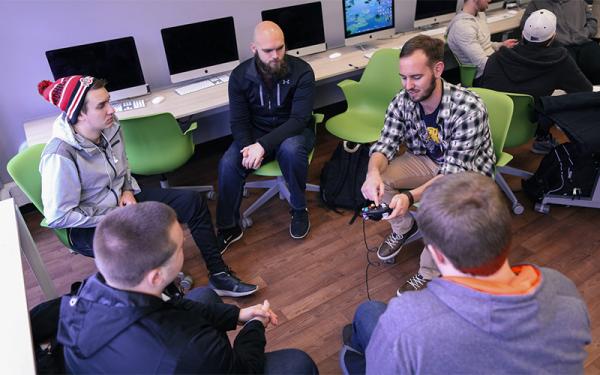
Denney 316 is our video game lab. Students in video game analysis classes may use the space for out-of-class playthroughs, and anyone is welcome to use the space for relaxation.
Denney 312 is set up with movable/reconfigurable tables, and a portable whiteboard, as well as a few iMac stations and a large display monitor. Good for: collaboration, digital media production.
Denney 308 is set up with a long conference table, worktables around the edge of the room, and a large display monitor. Good for: meetings, study.
Denney 307 is set up with tablet-arm desks and a large TV for displaying computer or tablet content. Good for: studying, presentations.
DMP Workshops
We have three workshops scheduled in the month of April, designed to give you quick info to help you as you create final projects and get ready for summer and beyond. See each event page for details.
- What the Heck Is Microsoft 365? (30-min Info Session)
Microsoft 365, OneDrive and Teams, Outlook, Buckeyemail, cloud-sync and on-demand files... what does it all mean, and how can it help you?
April 5 and 9 - Stop Taking Bad Pictures (15-min Lightning Talk)
Most of us take snapshots every single day, but unfortunately, many of those photos just aren't very good! This 15-minute lightning talk can help.
April 3, 4, 10, and 11 - You Should Make a Website (15-min Lightning Talk)
You've got ideas to share, and it's never been easier to create a good-looking website, so what's stopping you. Let us show you some possibilities.
April 2, 5, 9, and 12
For recordings of past workshops, check out our Resources page, or visit the DMP YouTube channel.
DMP Staff
DMP Manager: Mike Bierschenk
DMP Student Assistants: Renn Bowen, Blaise Reader, Alex Thompson
What is the Digital Media Project?
The Digital Media Project (DMP) serves as a digital and technology hub for the Department of English. The DMP main office is in 324 Denney Hall, and our four supported classrooms are also on the third floor of Denney. We support students’ academic and intellectual growth during their time at The Ohio State University, we prepare students to be tech- and digital-media-savvy professionals after they leave our campus, and we train our instructors so that they can incorporate cutting-edge digital media pedagogy into their teaching both in our department and in future faculty positions.
Our Mission
To enrich the experience of students in the English department through digital media production work.
Through DMP resources, from video cameras to computers equipped with specific programs geared towards English courses, students are able to expand their understanding of elements of the English curriculum from narrative to critical analysis to writing and more. Whether students are creating a film for Literacy Narratives of Black Columbus or crafting an accessible text for a Disability Studies course, the DMP strives to provide the resources necessary to ensure that all students find success.
To prepare students to succeed in the professional world after they graduate.
English majors and minors have long been sought-after hires in a wide range of fifields because they can communicate clearly and with ease. In today’s work world, communication takes a variety of forms, from writing to images to video to animations. The DMP helps students develop fluency in all these forms of communication by training them in a range of genres like video and podcasts using industry-standard software like Adobe Creative Cloud.
To train instructors in cutting-edge digital media pedagogy.
The DMP offers instructors the opportunity to develop their own skills in digital media production and incorporate digital media into their own teaching. We accomplish this through staff-led workshops, as well as through our support of the Digital Media and Composition Institute (DMAC), an annual teacher-training program.